
Care governance. Connected.
One management view for audits, actions, maintenance and certification across care homes and groups. It sits above existing care planning and e-learning systems rather than replacing them.
Built for UK adult social care providers: individual care homes and multi-home groups.
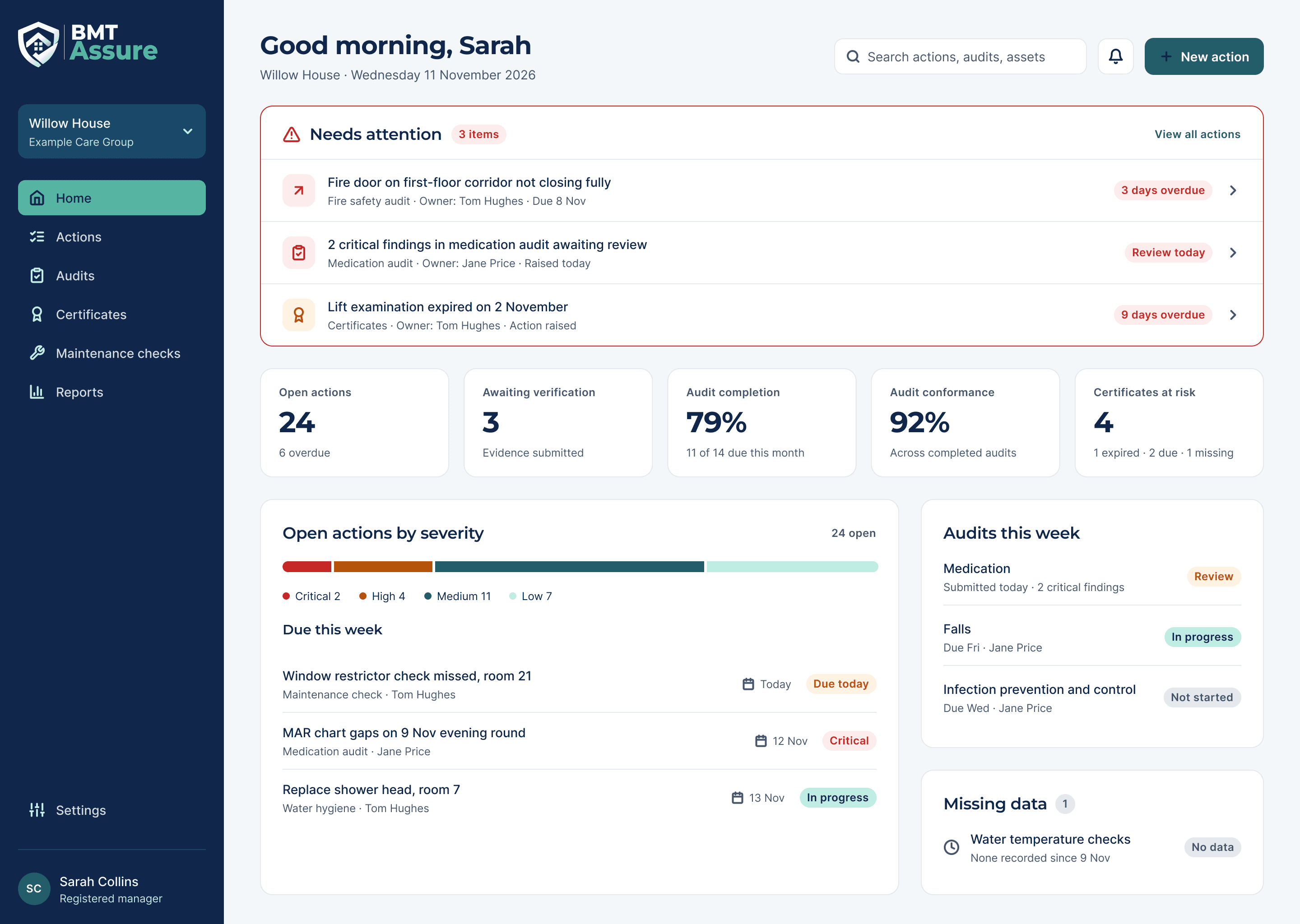
One action plan, clearer oversight and less duplication.
BMT Assure helps managers identify risks, assign ownership, verify resolution and demonstrate oversight, without forcing them to use multiple disconnected systems.
What it holds to
- One central action register, not separate plans per module.
- Critical risks stay visible even when overall scores are high.
- Missing data is shown as missing, never as good performance.
- Closure needs verification or an authorised exception.
- Findings are indicative and internal, never CQC ratings.
How it works
One complete assurance journey, from a configured provider to a verified resolution, with the full history kept reportable and tamper-evident.
Set up the provider
Configure your provider, homes and optional units, then invite users and give each one a predefined role and scope.
Complete the audit
Start an audit from a published version of the standard template and complete it on desktop, tablet or phone, adding evidence as you go.
Record and grade findings
A failed or partial answer prompts an evidence-backed finding. The system suggests a risk grade of Routine, Medium, High or Critical, and an authorised person confirms it or changes it with a reason.
Manage one set of actions
Confirmed findings create or link a central corrective action with an owner, a due date, the problem and a measure of success.
Verify independently
The owner submits completion evidence. A different, eligible person accepts it and closes the action, or returns it with reasons. Nobody verifies their own work.
Keep the full history
Audit, finding, action and verification history stays reportable, with a printable audit summary and a tamper-evident trail.
Inside BMT Assure
Mobile-first for doing tasks, desktop-first for oversight. Screens are from the Phase 1 designs and show example data.
Manager dashboard
Starts with what needs attention. Critical findings, overdue safety records and missing data stay visible independently of aggregate scores, alongside open actions, audits due and certificates at risk.
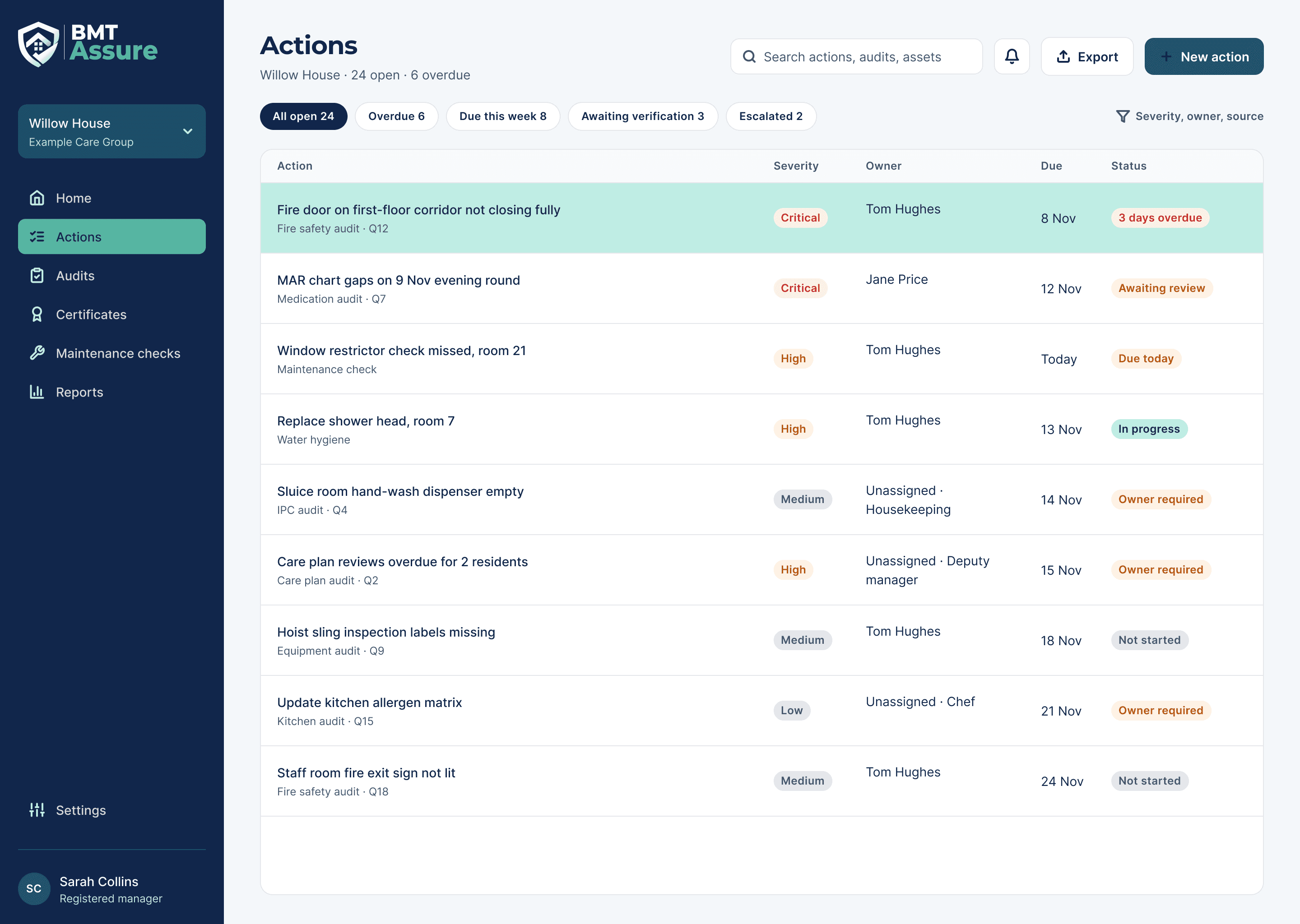
Central actions
One register for audits, maintenance and manual findings. Each action shows its severity, named owner, due date and status. An action without an owner is marked as needing one and cannot progress to verification.
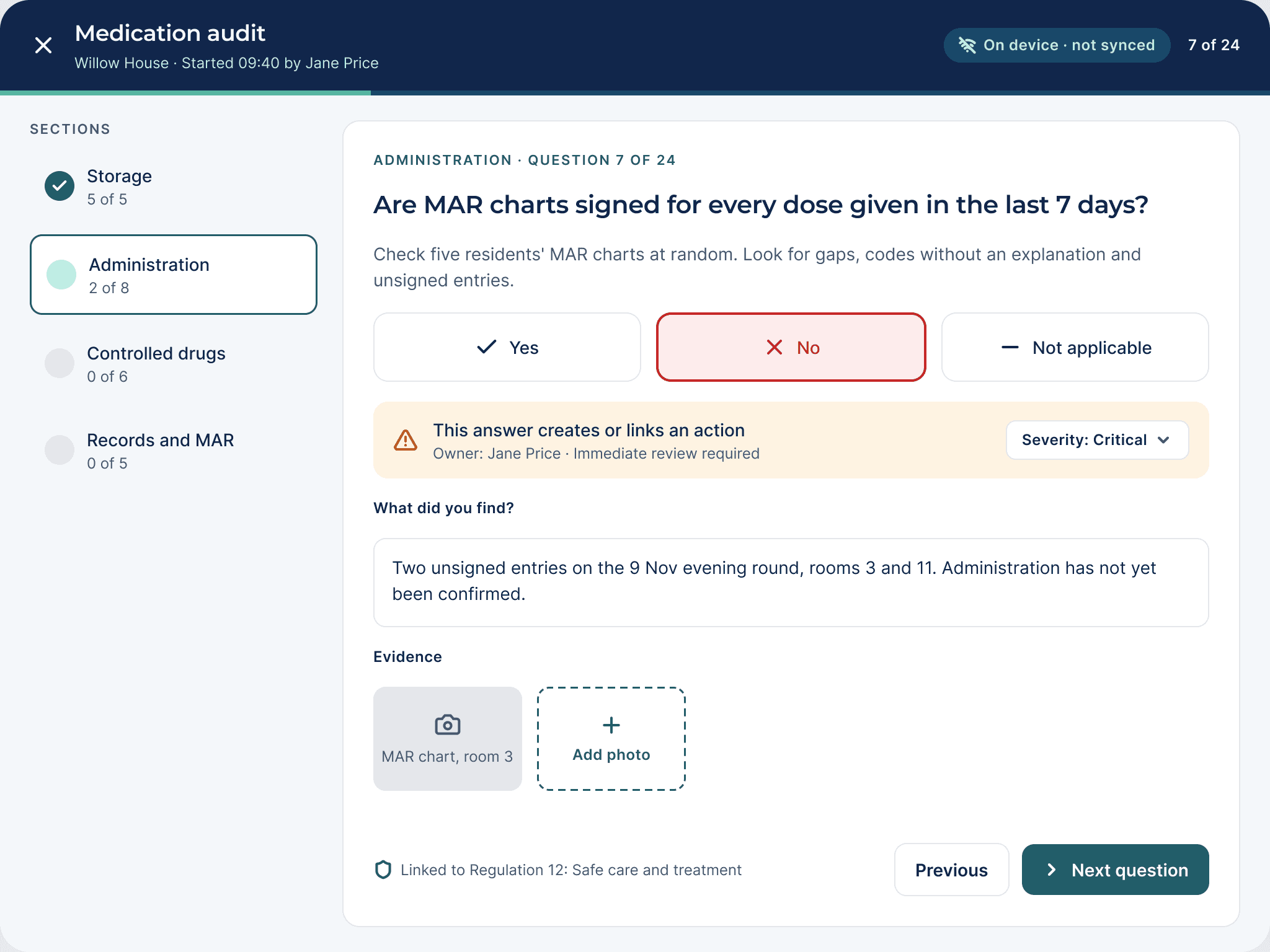
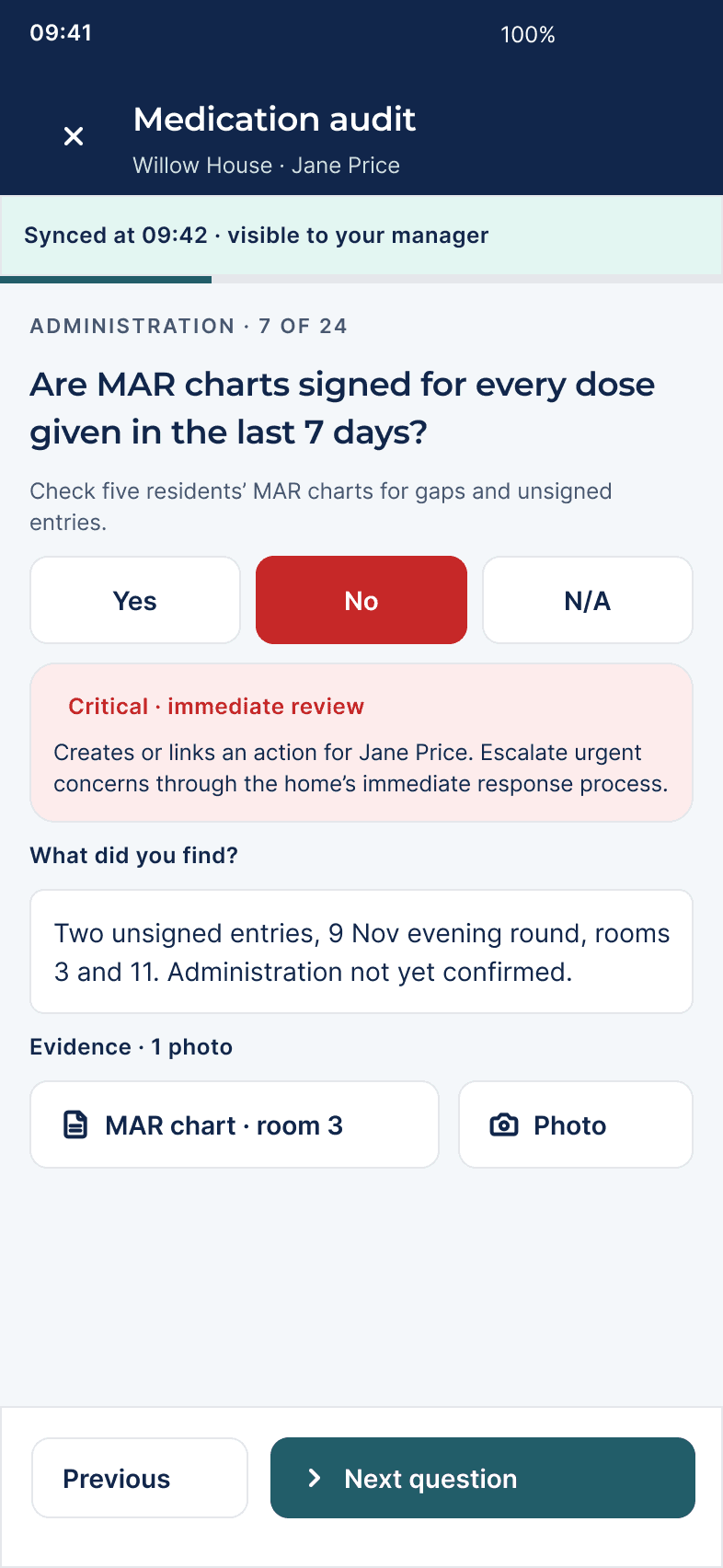
Audits on tablet and iPhone
Auditors work through each section question by question, with touch-sized controls, photo evidence and a visible save status. A failed answer creates or links a central action, so nothing is entered twice.
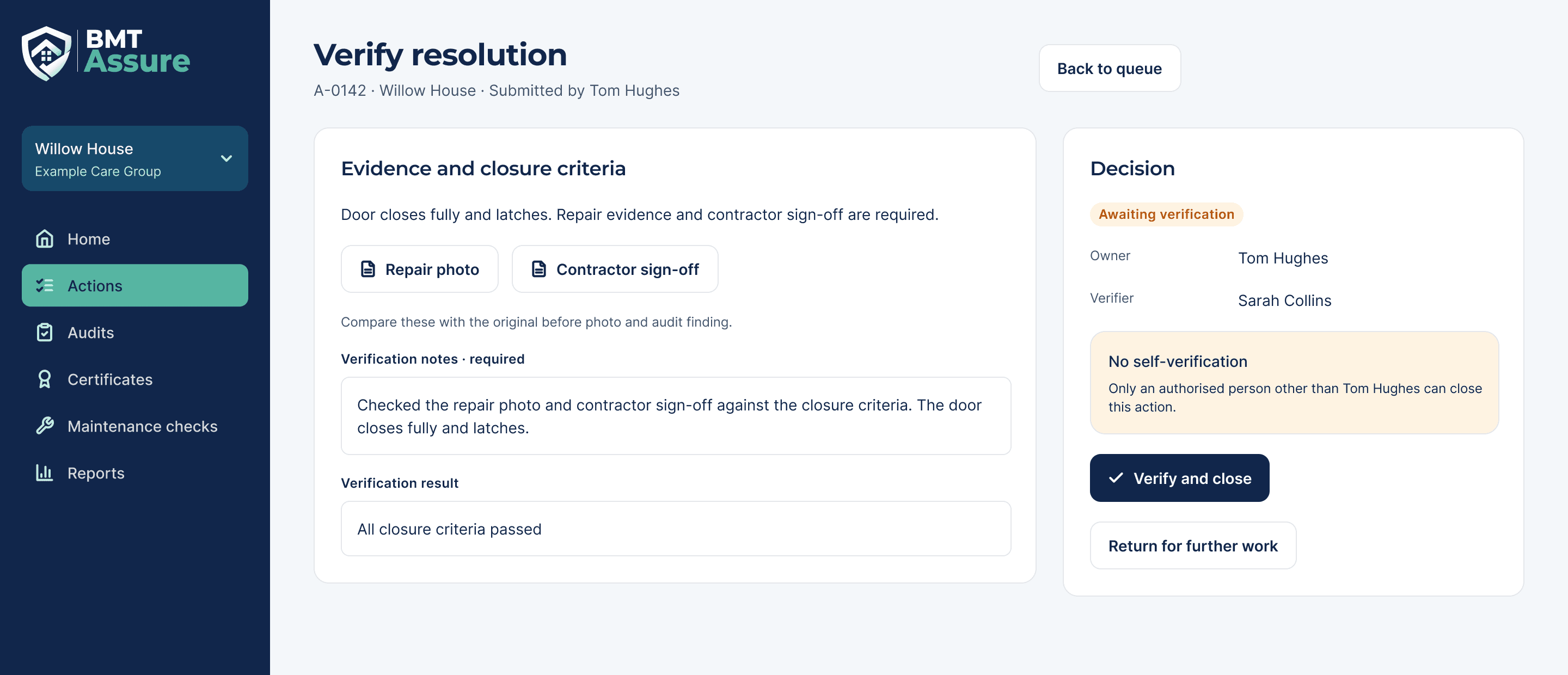
Independent verification
The action owner cannot verify their own work. The verifier reviews the evidence against the closure criteria, then verifies, returns the action or records an approved exception. Reopening an action keeps the previous decision.
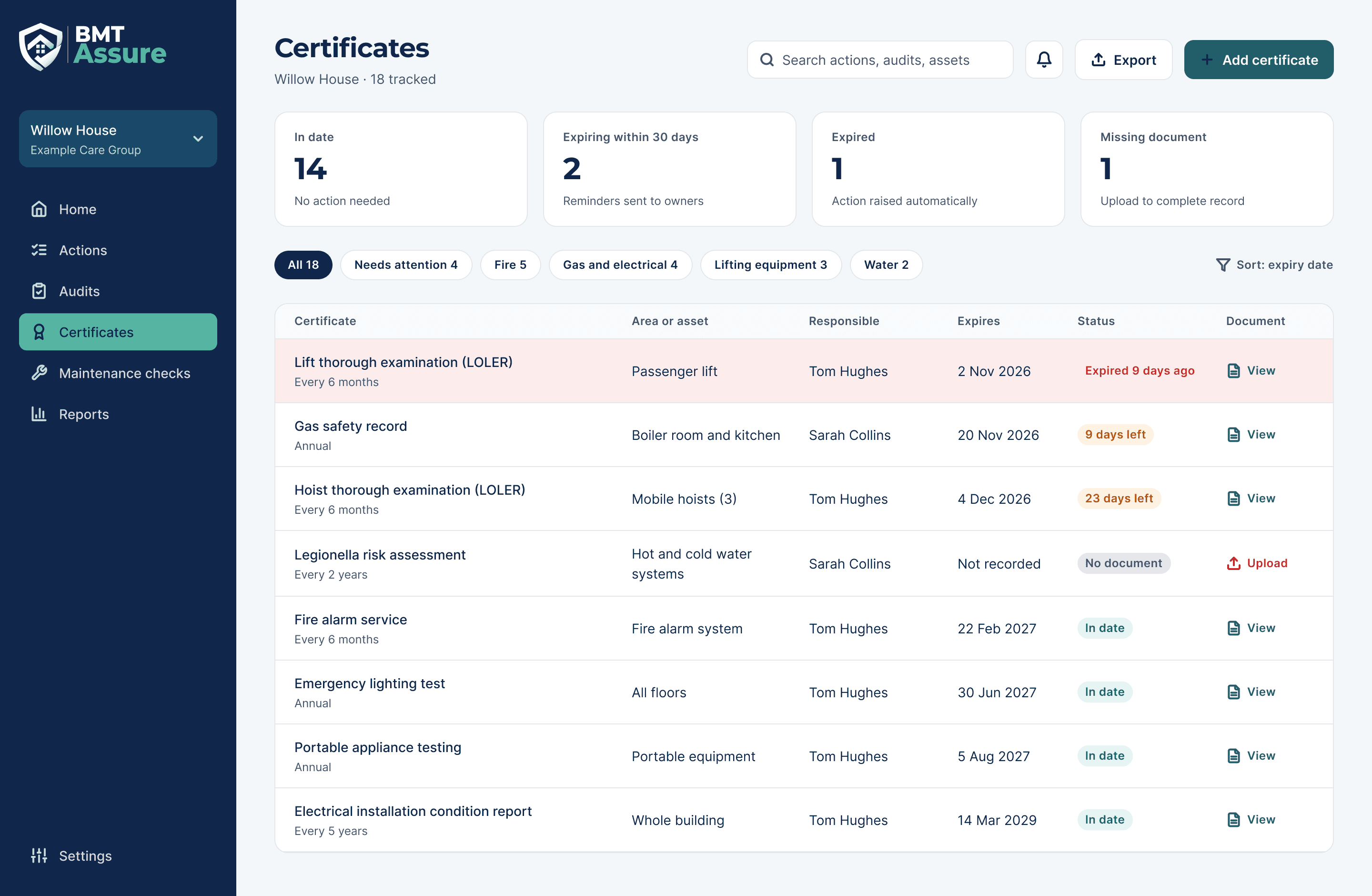
Certificates
Track each certificate by area or asset, responsible person and expiry date. Expiry, missing documents and unresolved findings are shown separately, and a replacement document keeps the previous version and needs review before the record changes.
Also in the Phase 1 designs
- Regional dashboard
- Compare homes and drill into each one, with reporting periods, denominators and missing data shown. Visibility is limited to assigned homes, and acknowledging an escalation does not close the action.
- Audit library and scheduling
- A library of versioned audit templates and a recurring scheduler. Historical submissions keep their original version, and failed answers create or link central actions without duplicate entry.
- Maintenance checks
- A check register with completion and recurring schedules, so missed checks show up as missing rather than passed.
- Access management
- People, role assignments, sign-in and MFA, scoped by organisation and home, with separate permissions to view, edit, approve, export and delete.
Security and data protection
How BMT Assure is built.
- Multi-factor authentication
- MFA is required for Provider Administrators, Directors and Nominated Individuals, Registered Managers and Independent Verifiers. A provider can require it for every user.
- Each provider kept separate
- Every provider is an isolated data boundary. Access never crosses providers, and every request is checked against the user's provider and scope on the server, not just hidden in the screen.
- Append-only audit trail
- Security and business events are recorded with who, what and when. Events can be added but not edited or deleted, and no role can delete audits, findings, actions, evidence or verification records.
- Encrypted in transit
- All traffic to BMT Assure is encrypted with TLS 1.2 or higher.
- Designed with UK GDPR in mind
- BMT Assure collects only what an audit or action needs, keeps resident names out of dashboards and notifications, and sends email alerts as a neutral task link rather than finding details.
Who it's for
Built for UK adult social care providers: individual care homes and multi-home groups. Access follows predefined roles and scopes, so a job title on its own never grants access.
- Provider Administrator
- Provider settings, homes, units, accounts, roles, scopes and security. Administration rights do not open operational records.
- Director or Nominated Individual
- A provider-wide assurance dashboard and operational read access across homes.
- Registered Manager
- Oversight of their homes: assigning audits, confirming findings, managing actions and permitted approvals.
- Deputy
- Delegated operational work for named homes, optionally for a set period.
- Auditor
- Carries out assigned audits, uploads evidence and raises findings.
- Care Staff and Action Owners
- View and update the audit questions or corrective actions assigned to them.
Independent Verifier is a separate assignment rather than a role. It lets an eligible person accept or return evidence on actions they do not own and did not work on.
Get in touch
To talk to BM Technologies about BMT Assure for your care homes, send us a message and we will reply by email.
Already using BMT Assure? Log in